Game tools / Build planning / Game guide
PoE 3.30 Atlas tree planner: share links and import short codes
Check the 150-point tree, reproduce a small route, and recover it with a share link or minified code. Includes a tested fix for using the wrong import field.
Open original tool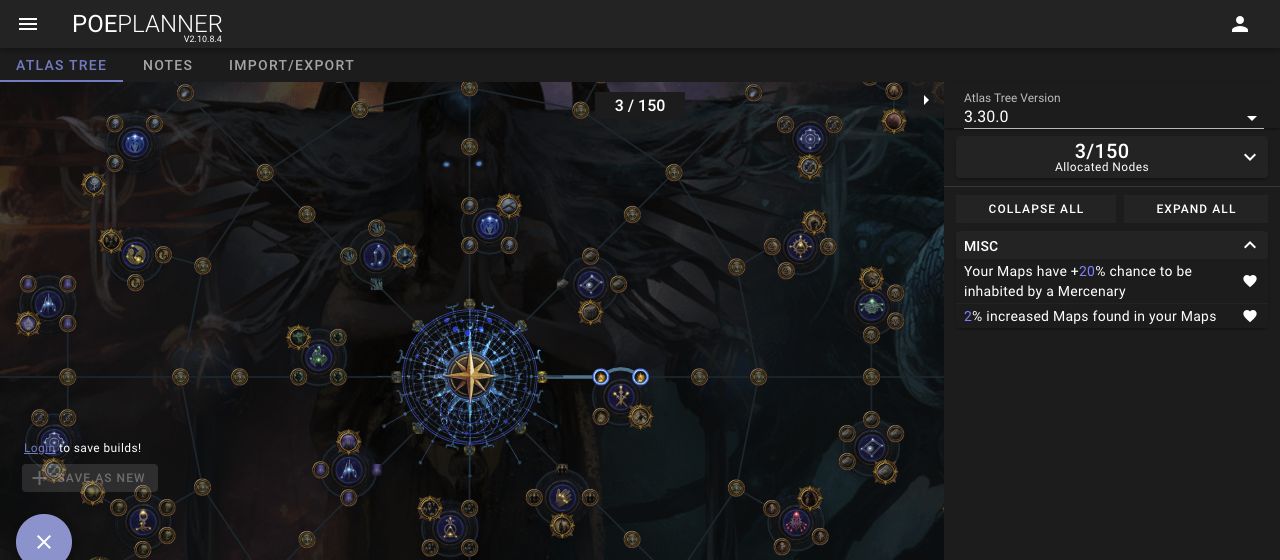
Use the Atlas tree, with the correct version
Open PoE Planner’s Atlas page and select 3.30.0 in Atlas Tree Version. Our check used the normal tree, not the separate Ruthless option. Confirm the version before copying any route; a character passive tree and an Atlas tree are different screens.
Grinding Gear Games’ 3.30.0 notes describe a rebuilt Atlas starting at the centre and an earnable cap of 150 points, increased from 138. The cap is not a starting allocation: plan against the points your character has actually earned.
This page is a hands-on planner workflow checked November 13, 2026 in PoE Planner V2.10.8.4. It is not a farming recommendation or a test of the new league inside Path of Exile.
A three-point example you can verify
Open the three-point example linked in Sources below. From the centre, we selected the first node to the right, Map Drop Chance: the planner showed 1/150 and 2% increased Maps found in your Maps. Selecting the second Mercenary Chance node farther along that right-hand branch brought the allocation to 3/150.
The 3-point summary showed 2% increased Maps found in your Maps and +20% chance to be inhabited by a Mercenary. These are displayed modifiers from this small tool test. They do not establish an optimal opening, a measured drop-rate gain, or profit per hour.
| Checkpoint | Expected in this example |
|---|---|
| Version | 3.30.0 normal |
| Allocation | 3/150 |
| Maps modifier | 2% increased Maps found in your Maps |
| Mercenary modifier | +20% chance to be inhabited by a Mercenary |
Export a route without confusing the fields
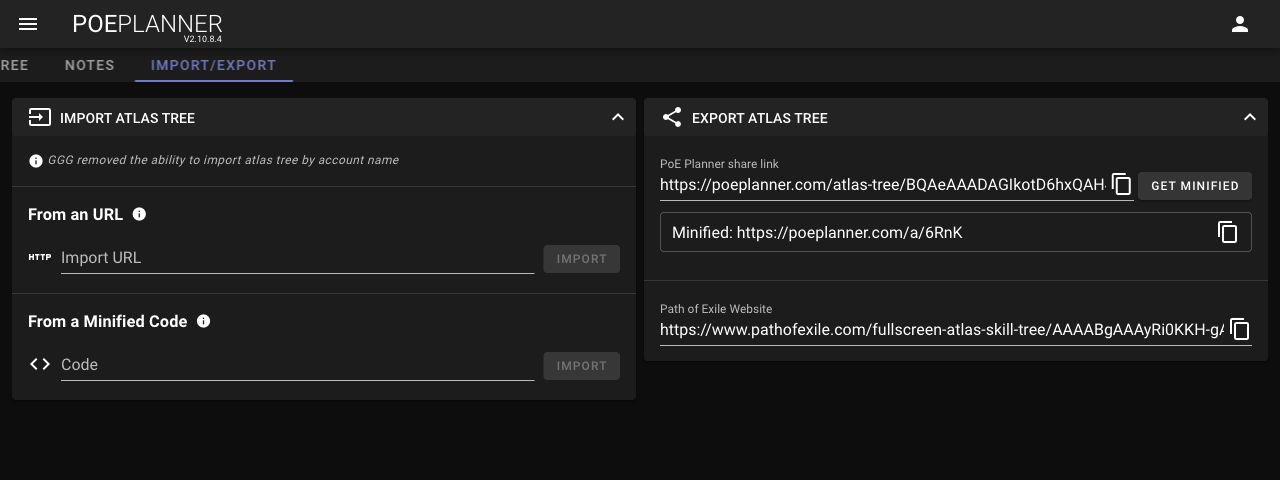
Open IMPORT/EXPORT. The export panel provides a PoE Planner share link. GET MINIFIED generated a shorter link for our example: https://poeplanner.com/a/6RnK. Opening that short address in a separate tab restored the same 3-point route and modifiers.
Keep the ordinary full share link as well. The test confirms this example worked on the checked date; it does not guarantee that a hosted short-link service will always be available. SAVE AS NEW was disabled while logged out, so we did not test account-based saving.
- To view a shared route, open its PoE Planner link directly in a new tab.
- To import a minified code inside the planner, use the dedicated From a Minified Code section.
- Keep the tree version, allocated count and important modifiers with your saved link so you can verify a future restore.
Short link fails to import? Try the bare code
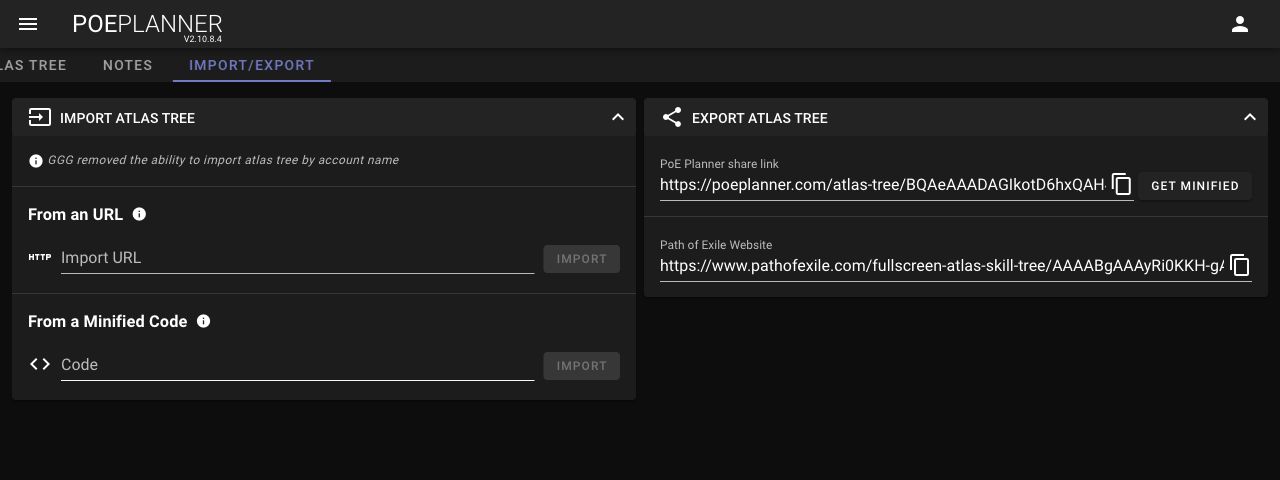
After RESET returned the tree to 0/150, we pasted https://poeplanner.com/a/6RnK into From an URL. That attempt displayed “Something went wrong while importing your atlas tree”. The short link itself still opened correctly in a new tab.
We then entered only 6RnK under From a Minified Code and used the IMPORT button beside that field. The planner displayed “Successfully imported atlas tree”. Returning to ATLAS TREE showed 3/150 and the same two modifiers.
If you reproduce this version’s error, use the bare code in the code field or open the short link directly. This is one verified recovery path, not a claim that every URL import fails or every third-party planner uses the same format.
Check what survived before extending the plan
A successful import message is only the first check. Compare the selected tree version, allocated count and the modifiers that matter to your plan. Stop if a shared route restores a different version or an unexpected allocation.
For an original comparison, record your current point budget, pick one target cluster and note the total points needed to reach it, including travel. Save that branch before trying an alternative. This is a planning worksheet, not a claim about which mechanic earns the most currency.
- This check did not import an old 3.29 route or test conversion between versions.
- PoE Planner also generated a Path of Exile Website URL; we did not validate that exported URL in GGG’s viewer.
- We tested no client installation, mapping run, character gear, farming yield or account import.
| Record | Why it matters |
|---|---|
| Actual available points | A 150-point theoretical route may exceed your progression. |
| Route and travel total | A distant cluster spends points before its desired effect. |
| Displayed modifiers after restore | A link must recover the intended plan, not merely load a tree. |
| Tool and tree version | Launch updates can change a route or the importer. |
Small screens and the external tool
At 360px, the version, point count and modifier summary were readable, but the open side panel covered most of the tree. Its edge arrow switched back to the canvas. This was a narrow desktop-browser viewport check, not a real-phone touch test. A larger screen is easier for following the route example.
The screenshots here are tool captures. Use the original-tool link to edit a tree; this guide does not embed the planner or host Path of Exile’s game files.
Sources & update record
- Grinding Gear Games—official 3.30.0 patch notes, Atlas Passive Tree Changes
- PoE Planner—original Atlas planner
- Our three-point example—short link tested in a separate tab
- Our three-point example—full share link
November 13, 2026 — Rules and creator information checked against these sources. This is an independent introduction, not a hands-on review. Game names belong to their respective owners.
Another game, another little discovery.

Endfield builds: gear plans, combo priority and trial equipment
Use the Sanctuary of Ink build-planning features, read the official Gear Plan example and find the documented trial-equipment route.
Read the guide
Deadman Danny builds: patch checks before choosing items
Use Valve’s dated balance notes to evaluate a Deadlock build instead of copying an old item list without its assumptions.
Read the guide