PC / Tactical FPS / Game guide
Hamburger Hill: campaign, Quick Play and the Windows/macOS versions
Find Wesware’s original download, compare the currently listed builds, and understand what the 0.7.0 campaign and rescue changes mean before your first session.
View official page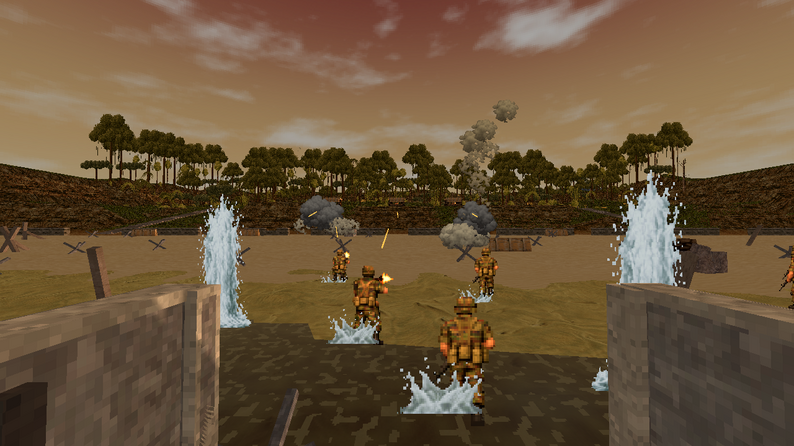
Choose Wesware’s military FPS
This page concerns Wesware’s single-player Hamburger Hill, set in Granovia. The name also appears in other media, so check the author and project before choosing a download. The creator lists Windows and macOS builds; this is a downloadable game, not a browser player.
Its campaign combines planning, soldier equipment and battles you fight yourself. Quick Play is a separate route for setting up a battle. The project remains marked in development, so a guide for one build should not be treated as a permanent feature list.
Check the file version before reading a patch guide
The original project listed the following files when checked on October 29. The two operating systems did not have matching version numbers. Download through the creator’s page so you can see the current filenames and any newer notes.
| Platform | Listed file | How to read it |
|---|---|---|
| Windows | hamburger-hill-0.7.0-windows.zip | The 0.7.0 release post explicitly covers Windows. |
| macOS | hamburger-hill-0.4.0-macos.zip | Do not assume the Windows 0.7.0 changes are included. |
Use campaign planning as preparation
The creator describes taking territory, resisting counterattacks and keeping soldiers alive. For a first session, inspect the campaign view and equipment screen before committing to an assault. Note the selected mission objective rather than assuming every battle has the same win condition.
The Windows 0.4.0 update describes retaining a twelve-person squad between battles, one assault per turn and AUTO recruitment when replacements are needed. Those are dated Windows patch notes, not a verified statement about the currently listed Mac build.
What Windows 0.7.0 changes
The October 26 release notes cover performance, rendering and AI work, improved helicopter extraction, a redesigned campaign sidebar and attack previews. They also list equipment tooltips, clearer mission objectives and binocular support controls.
Those changes make the current mission text and preview useful places to check before acting. The post also mentions recruitment, balance and artillery-warning fixes. It does not establish a particular best squad or guarantee that every mission issue has been resolved.
Distinguish rescue instructions from Quick Play
The earlier Windows 0.4.0 rescue note describes calling extraction with a flare, then defending the aircrew against incoming waves. The later 0.7.0 post says extraction missions were improved. This gives context for the rescue objective, but we have not verified its complete sequence or controls in-game.
Quick Play instead lets you vary battle conditions such as terrain, weather and opposing forces. The project advertises large battles and up to three factions while describing the game as single-player. That wording does not establish online human multiplayer.
Keep an old guide beside the current build
Check the operating system, filename and release post together when a screenshot or tip looks different. Older interface instructions may predate the redesigned sidebar or tooltips. This page is an entry guide based on developer material, not a performance benchmark or campaign walkthrough.
In the game
Sources & update record
- Wesware — original project and current files
- Wesware — Windows 0.7.0 release notes
- Wesware — Windows 0.4.0 update notes
October 29, 2026 — Rules and creator information checked against these sources. This is an independent introduction, not a hands-on review. Game names belong to their respective owners.